> ## Documentation Index
> Fetch the complete documentation index at: https://cubed3-igor-document-row-level-allow-all.mintlify.site/llms.txt
> Use this file to discover all available pages before exploring further.
# MCP server
> Connect MCP-aware assistants to Cube through a hosted HTTPS endpoint with OAuth and admin-managed defaults.
Cube MCP (Model Context Protocol) lets MCP-compatible AI clients connect to Cube over HTTPS using OAuth.
This page covers the **Cube connector**, which gives an AI assistant direct access to Cube
through MCP. It is not [Cube agent skills](/docs/integrations/agent-skills), which run in a
coding agent and operate Cube through the CLI, or
[Agent Skills in Cube](/docs/explore-analyze/skills), which are saved workflows your data
team authors for Analytics Chat.
The MCP server is available on [Premium and Enterprise plans](https://cube.dev/pricing).
Users need the [Viewer][ref-roles] role or higher to interact with the MCP server. Which tools a
user sees depends on their role — see [Available actions](#available-actions).
## What is MCP?
Model Context Protocol (MCP) is an open standard that enables AI assistants to securely connect to external data sources and tools. The Cube MCP server acts as a bridge between your AI assistant and Cube's analytics platform, allowing you to ask data questions directly from your coding environment.
## Overview
Cube hosts an MCP server endpoint. MCP clients connect over HTTPS and authenticate via OAuth.
* **Endpoint:** `https://cubecloud.dev/mcp`
* **OAuth flow:** Authorization Code + PKCE, `client_id` = `cube-mcp-client`, scope = `mcp-agent-access`. Clients discover it automatically from the endpoint — there is nothing to configure by hand.
* **Account selection:** You sign in to Cube as part of the OAuth flow and, if you belong to more than one account, choose which one to connect.
* **Deployment selection:** On connect, the client lands on the tenant **default deployment** set by your admin (or the first deployment you can access). Clients can also target a specific deployment and agent per request — see [Select a deployment and agent](#select-a-deployment-and-agent).
### One endpoint for everyone
`https://cubecloud.dev/mcp` is the same URL for every account, deployment and region. Cube
identifies your account from the OAuth token and routes each request to whichever
deployment serves it, so there is no per-tenant host to look up before you can connect.
If Cube runs in your own cloud account or on your own domain, use that console domain
instead — `https:///mcp`.
Each deployment also keeps a **region-specific endpoint**, shown under
**Admin → MCP Server**. Both work. Prefer the single endpoint above unless you need a
client to reach a deployment's region directly without passing through the control plane.
## Admin setup
### Prerequisites
Before enabling MCP, make sure you have:
* **Admin privileges** in your Cube instance
* An active Cube tenant
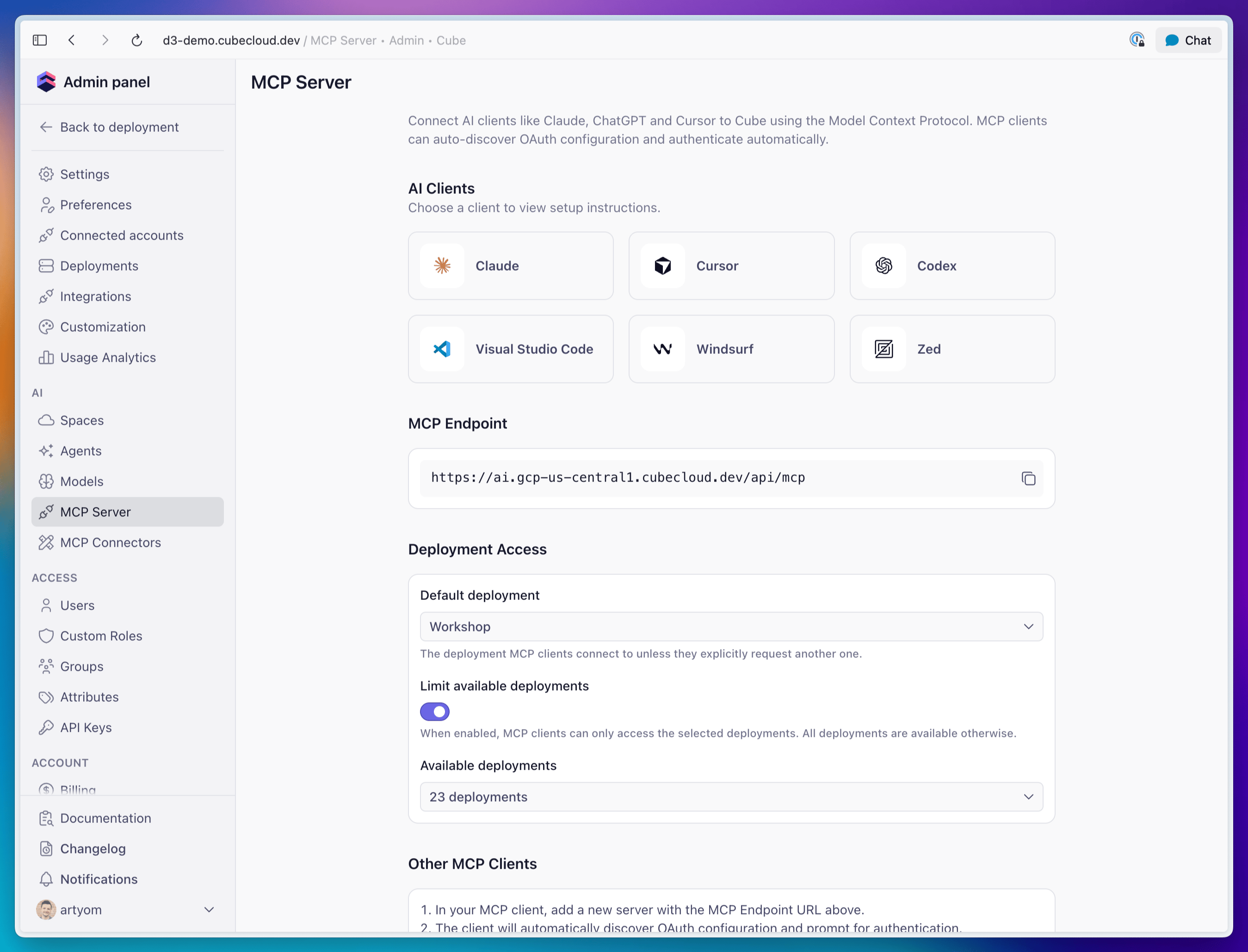
### 1) Check the MCP page
Go to **Admin → MCP Server**. The page shows the endpoint to hand to clients along with
ready-made setup snippets for each supported client. If it reads “MCP configuration is
unavailable,” the MCP server host isn’t configured for the account yet.
### 2) Configure deployment access
Go to **Admin → MCP Server** and use the **Deployment Access** section to control which
deployments MCP clients can reach and where they connect by default:
* **Default deployment** — the deployment MCP clients connect to unless they explicitly
request another one. Choose **Automatic (first available)** to land each user on the
first deployment they can access.
* **Limit available deployments** — when off (the default), MCP clients can access **all**
deployments the user is permitted to see. Turn it on to restrict MCP to a chosen subset.
* **Available deployments** — when the limit is on, pick the deployments MCP clients may
access. Selecting none disables MCP access for the account.
Deployment access is always intersected with the user's
[role-based permissions][ref-roles] — clients can only reach deployments the
authenticated user is allowed to see.
 ## Connect to Claude
Cube is available in the
[Claude Connectors Directory](https://claude.ai/customize/connectors). Connect it once
and use it in Claude on the web, desktop, or Claude Code—there is no endpoint to paste or
local server to configure.
1. In Claude on the web or desktop, open **Customize → Connectors**.
2. Click **+**, choose **Browse connectors**, and search for **Cube**.
3. Select Cube and click **Connect**.
4. Complete the Cube OAuth flow and choose your tenant.
On a Team or Enterprise plan, an owner may need to enable Cube first under
**Admin Settings → Connectors**.
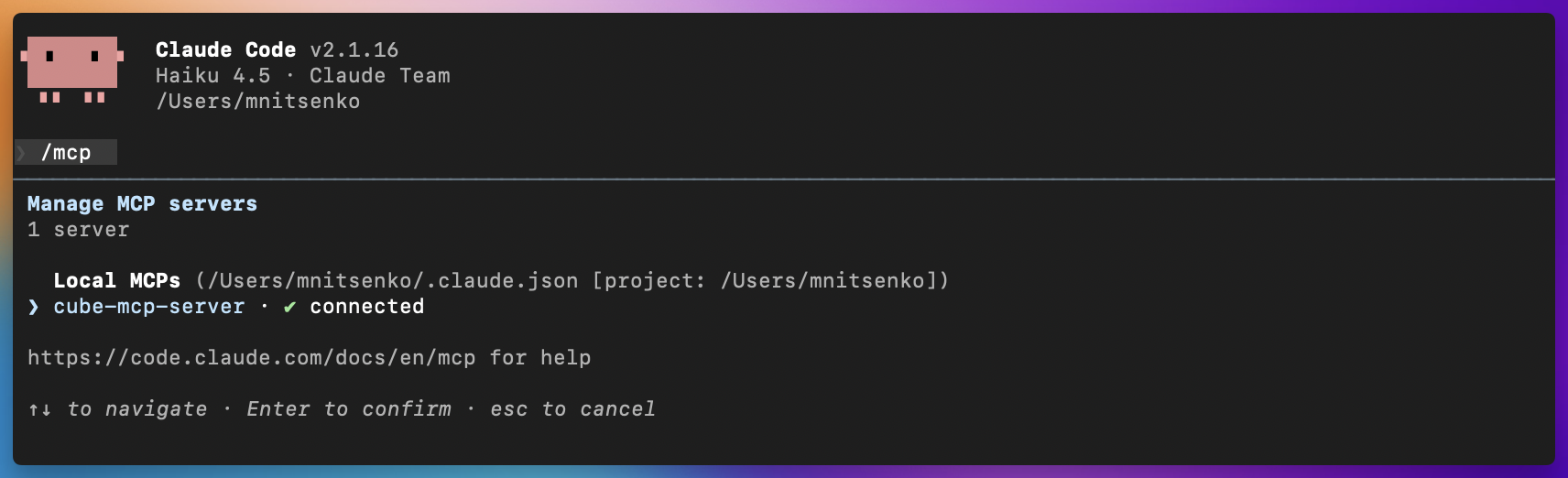
To use Cube in a chat, open the tools menu and enable the Cube connector, then ask a data
question. In Claude Code, run `/mcp` to confirm the connector is available and authenticate
if prompted.
## Connect to Claude
Cube is available in the
[Claude Connectors Directory](https://claude.ai/customize/connectors). Connect it once
and use it in Claude on the web, desktop, or Claude Code—there is no endpoint to paste or
local server to configure.
1. In Claude on the web or desktop, open **Customize → Connectors**.
2. Click **+**, choose **Browse connectors**, and search for **Cube**.
3. Select Cube and click **Connect**.
4. Complete the Cube OAuth flow and choose your tenant.
On a Team or Enterprise plan, an owner may need to enable Cube first under
**Admin Settings → Connectors**.
To use Cube in a chat, open the tools menu and enable the Cube connector, then ask a data
question. In Claude Code, run `/mcp` to confirm the connector is available and authenticate
if prompted.
 ## Connect to Cursor
Add the MCP endpoint under Tools & MCP Settings, then complete the OAuth flow.
```json theme={null}
{
"mcpServers": {
"cube-mcp-server": {
"command": "npx",
"args": ["-y", "mcp-remote", "--transport", "http", "https://cubecloud.dev/mcp"]
}
}
}
```
## Connect to Codex
Preferred (CLI):
```bash theme={null}
codex mcp add cube-mcp-server --url https://cubecloud.dev/mcp
```
If this is your first time using MCP in Codex, enable the feature in `~/.codex/config.toml`:
```editorconfig theme={null}
[features]
rmcp_client = true
```
Manual setup:
```editorconfig theme={null}
[features]
rmcp_client = true
[mcp_servers."cube-mcp-server"]
url = "https://cubecloud.dev/mcp"
```
Then run `codex mcp login cube-mcp-server` to authenticate.
## Connect to other MCP clients
For any MCP-compatible client:
1. Add a new server with the **MCP endpoint**.
2. The client will auto-discover OAuth and prompt for authentication.
3. Complete the OAuth flow to grant access to your Cube deployment.
## Select a deployment and agent
An MCP client is not locked to a single deployment for the whole session. After
connecting, it can discover the deployments and agents you can access and target a
specific one on each request.
Three tools work together:
* **`listDeployments`** — discovery. Returns every deployment you can access via MCP
(already filtered by the admin's deployment-access settings and your permissions) and
each deployment's agents. Use it to find valid `deploymentId` and `agentId` values
before calling `chat`. Every deployment offers an **Auto** agent (`agentId: null`) in
addition to any configured agents.
* **`chat`** — accepts two optional selection parameters:
* **`deploymentId`** — the deployment to use for this request. When omitted, the chat
uses the deployment from the current session (the default resolved at connect time).
* **`agentId`** — the agent to use for this request. When omitted or `null`, the
deployment's **Auto** agent is used. Pass a specific `agentId` to route to a
configured agent.
* **`loadQueryResults`** — paginates through the results of a previous query on the same
deployment context.
A typical client workflow:
Complete the OAuth flow. The session is scoped to the tenant default deployment (or
the first one you can access).
Call `listDeployments` to see the available `deploymentId` / `agentId` values.
Call `chat` with your `input`, optionally passing `deploymentId` and/or `agentId` to
target a specific deployment or agent. Omit both to use the session default deployment
with its Auto agent.
Requests are always validated against the admin's deployment-access settings. A deployment
that is outside the allow-list — or that you don't have permission to see — is rejected
with a **403 Forbidden** (`Deployment is not available via MCP for this account`), so
neither `listDeployments` nor the `chat` selection can reach an excluded deployment.
## Target a dev-mode branch
By default, an MCP session reads and queries the deployed data model. To exercise a
[development mode][ref-dev-mode] branch — a data-model change plus its agent
configuration (skills, rules, spaces) — before it's committed, connect with the dev
`branchName` returned by `startDataModelEdit`:
```text theme={null}
https://cubecloud.dev/mcp?branchName=dev--
```
A client that can't set a query parameter on the endpoint can send the same value as an
`x-mcp-branch-name` header instead (checked first; `mcp-branch-name` is a second, lower-priority
alias). Only an active dev branch is accepted — `main`, the deploy branch, or a branch
with no dev worker running is rejected at connect time with a `400` error, never a silent
fallback to the deployed model.
Once connected this way, every branch-aware tool below defaults to that branch instead of
the deployed model — you don't need to keep passing `branchName` on each call. Any tool
can still override it per call: pass a different `branchName` to target another branch for
just that one request, or pass `null` to force the deployed model for one call on an
otherwise branch-scoped session. Every response echoes back the branch it actually ran on
as `branchName` (`null` means the deployed model), so a client can always confirm what it
queried.
## Available actions
The MCP server exposes 30 tools, grouped below.
Every tool runs as the authenticated user. Queries respect the same
[permissions][ref-roles] as the rest of Cube, including row-level security — MCP is a new
way to reach your data, not a new access surface — with one exception, reachable two
ways: deleting a [workspace folder][ref-folders] skips the content-permission check the
Workspace page applies, whether it's [`manageFolders`](#dashboard-authoring) or the
agent behind [`chat`](#deployments-and-chat) doing the deleting.
### Read and write tools
Each tool is annotated as read-only, write, or destructive. MCP clients that honor these
annotations — including Claude — run read-only tools automatically and **always ask for
confirmation** before any of the nine destructive ones: `updateReport`, `deleteReport`,
`manageFolders`, `updateDashboard`, `publishDashboard`, `writeDataModelFile`,
`deleteDataModelFile`, `mergeToDefaultBranch`, and `discardDataModelChanges`. A tool
annotated write, not destructive, may run without a prompt — including
`commitDataModelChanges`, which can publish straight to production in one case; see [How
model edits stay safe](#how-model-edits-stay-safe). A tool annotated read-only can still
cause a write once it runs — `chat` is that case; see [Deployments and
chat](#deployments-and-chat).
### Deployments and chat
| Tool | Description | Access |
| ------------------ | ---------------------------------------------------------------------------------------------------------------------------------------------------------------------------------------- | ----------------------------- |
| `listDeployments` | Lists the deployments and agents you can reach over MCP. | Read-only |
| `chat` | Asks a question of a Cube agent, optionally targeting a specific deployment and agent. Pass `branchName` to have the agent answer from a dev branch's model instead of the deployed one. | Read-only — see warning below |
| `loadQueryResults` | Paginates through the results of a previous query. | Read-only |
See [Select a deployment and agent](#select-a-deployment-and-agent) for how these three
work together.
`chat`'s **Read-only** annotation covers only the MCP call itself, not what the agent
does in response. It's the same agent Analytics Chat uses, with the same write-capable
tools — creating reports, organizing workspace folders — when the caller's access allows
it, and the agent's own folder actions run with no confirmation step — unlike
`manageFolders` below, which a client prompts for. A client that runs `chat`
automatically because the annotation says read-only can still cause an unconfirmed write
through the agent's own reply.
A chat conversation is pinned to whichever branch answered its first message — later
messages in the same conversation stay on that branch, and `loadQueryResults` pages using
it. Passing a different `branchName` while resuming an existing `chatId` fails rather than
silently switching branches mid-conversation: omit `branchName` to keep talking on the
conversation's branch, or omit `chatId` to start a new conversation on the one you want.
### Query and discovery
| Tool | Description | Access |
| ----------------- | -------------------------------------------------------------------------------------------------------------------------------------------------------------------------------------------------------------------------------------------------------------------------------------------------------------------------------------------------- | --------- |
| `searchDataModel` | Searches the semantic model by similarity — views and their measures and dimensions — to discover what is queryable. Returns compact records (name, title, description, type) to reference in `runQuery`. Pass the dev `branchName` from `startDataModelEdit` to search that branch's model, including members that don't exist in production yet. | Read-only |
| `runQuery` | Runs a Cube SQL query (PostgreSQL dialect) against the [SQL API][ref-sql-api]. Returns a schema, a page of rows, and `hasMore` / `totalRows` for pagination via `offset`. Pass the dev `branchName` from `startDataModelEdit` to query that branch instead of the deployed model. | Read-only |
Call `searchDataModel` before `runQuery` to find exact view and member names rather than
guessing them — pass the same `branchName` to both so the members you find are the ones the
query will see.
Omitting `branchName` on a call uses the session's branch if you [connected with
one](#target-a-dev-mode-branch), or the deployed model otherwise; passing `null` forces the
deployed model for that one call regardless of the session. Passing a `branchName` that
isn't an active dev branch — for example the deploy branch's own name, or a feature branch
with no dev worker running — fails with an error rather than silently answering from the
deployed model, so a query aimed at the wrong branch never looks like a query that just
returned no rows.
### Dashboard authoring
These tools build [workbooks][ref-workbooks] and [dashboards][ref-dashboards]
programmatically. Creating and editing workbooks requires the Explorer role or higher.
| Tool | Description | Access |
| ------------------ | ------------------------------------------------------------------------------------------------------------------------------------------------------------------------------------------------------------------------------------------------------------------------------------------------------------------------------------------------------ | --------------------- |
| `readWorkbook` | Reads a workbook — its name and its current dashboard draft and published configs. | Read-only |
| `createWorkbook` | Creates a new empty workbook, the container that holds reports and a dashboard. | Write |
| `createReport` | Saves a query plus its visualization. Pass `workbookId` to create a report inside a workbook and get the `reportId` a chart widget references; omit `workbookId` to save a standalone [exploration](/docs/explore-analyze/explore#saving-explorations) instead. Pass `folderId` to file a standalone exploration in a [workspace folder][ref-folders]. | Write |
| `readReport` | Reads one workbook report or standalone exploration by id — its title, SQL, chart spec, placement, and a shareable URL. | Read-only |
| `updateReport` | Edits an existing workbook report or exploration in place, keeping its `reportId`. Send only the fields you want to change — including `folderId` to move a standalone exploration into a [workspace folder][ref-folders]. | Destructive — prompts |
| `deleteReport` | Deletes a workbook report or exploration. | Destructive — prompts |
| `manageFolders` | Lists, creates, renames, moves, or deletes the [workspace folders][ref-folders] that standalone explorations, workbooks, and dashboards are filed in. | Destructive — prompts |
| `updateDashboard` | Saves the dashboard layout to the workbook **draft**. Replaces the full widget set and does not go live. | Destructive — prompts |
| `publishDashboard` | Publishes the current draft to make it live. Idempotent — republishing an unchanged draft is a no-op. | Destructive — prompts |
Drafts are the safety net here: `updateDashboard` only ever writes to the draft, so a
published dashboard keeps serving its previous version until you approve
`publishDashboard`. See [Build a dashboard](#build-a-dashboard) for the full sequence.
Call `manageFolders` with `action: "list"` first to get a folder's numeric id — that id,
not its name, is what `folderId` takes on `createReport` and `updateReport` to place a
standalone exploration inside it. The annotation covers the whole tool, so a client
prompts for `list` as it would for `delete`. Its delete [destroys less than the
Workspace page but checks less too][ref-deleting-folders].
**To change an existing report, use `updateReport` — never recreate it.** A dashboard's
chart widget points at a specific `reportId`, so replacing a report with a new one orphans
every widget referencing it. The same caution applies to moving a report between workbooks:
a widget resolves its report from its *own* workbook's report list, so changing a report's
`workbookId` empties the tiles on the old workbook's dashboard. Call `readWorkbook` and
re-point those widgets with `updateDashboard` first.
### Data model editing
These tools read and edit the semantic model **source** files. They are registered only
for users whose role grants permission to edit the semantic model — Admin and Developer by
default. Users without it never see them.
| Tool | Description | Access |
| --------------------- | ------------------------------------------------------------------------------------------------------------------------------------------------------------------------------- | --------------------- |
| `listDataModelFiles` | Lists the semantic model source files (raw YAML, JavaScript, or Python). Pass `branchName` to list a dev branch's files instead of the deploy branch's. | Read-only |
| `readDataModelFile` | Reads one file's raw source. Pass `branchName` to read it from a dev branch instead of the deploy branch. | Read-only |
| `startDataModelEdit` | Enters [development mode][ref-dev-mode], starts a dev worker, and returns the dev `branchName` that every write tool requires. | Write |
| `writeDataModelFile` | Creates or overwrites a model source file on the dev branch (whole-file replacement). Recompiles the model and reports `valid` plus any `validationError`. | Destructive — prompts |
| `deleteDataModelFile` | Deletes a model source file on the dev branch. | Destructive — prompts |
| `getDataModelChanges` | Shows the diff of the dev branch against its parent — the pending changes, for review before committing. | Read-only |
| `getBranchDiff` | Shows what **any** branch changed against the deploy branch: the changed-file list with per-file line counts, plus the unified diff. | Read-only |
| `getDeploymentEnv` | Lists the deployment's environment variables, with every secret-looking value redacted to `[ENCRYPTED]`. Useful for confirming configuration is present and shaped as expected. | Read-only |
`getDataModelChanges` answers "what have I changed?" for your own dev branch against its
immediate parent. `getBranchDiff` answers "what did this branch change?" for any branch,
including feature branches — reach for it when a change edits existing cubes, where the
file list looks identical on both branches and `listDataModelFiles` reveals nothing.
`getDeploymentEnv` never returns secret values. Anything that looks like a credential is
replaced with `[ENCRYPTED]` before it leaves Cube, so an AI client can verify that a
variable is set without ever seeing what it is set to.
### How model edits stay safe
Model editing over MCP is constrained by several mechanisms — most enforced by the MCP
server, one by clients that honor tool annotations, and one that is yours to apply —
with one gap noted below:
* **File writes never touch production.** Every write goes to a personal dev branch named
`dev--`. `writeDataModelFile` and `deleteDataModelFile` reject any branch
that isn't a dev branch, so no file edit can land on the deploy branch directly.
* **`startDataModelEdit` is the only entry point.** It returns the dev `branchName`, and
`writeDataModelFile` and `deleteDataModelFile` require it. There is no way to write
without going through it first.
* **Merging a branch to production prompts for confirmation.** `mergeToDefaultBranch` — the tool
that publishes an already-committed branch — is marked destructive, so a client always
prompts for confirmation. See [Committing and publishing
changes](#committing-and-publishing-changes).
* **Registration is permission-gated.** Every tool in Data model editing, Committing and
publishing changes, and Pre-aggregations — the six model-editing tools, `getBranchDiff`,
`getDeploymentEnv`, the six commit and branch tools, and both pre-aggregation tools — is
offered only to users whose role allows editing the semantic model. A Viewer never sees
any of them.
* **Deploy-branch writes are permission-checked at call time.** A role scoped to **Edit data
model on dev branches** still sees every tool listed above registered, but `mergeToDefaultBranch`
and `commitDataModelChanges` with `confirmPublishToDefaultBranch` fail for that role, the
same as any other write targeting the deploy branch.
* **Verify on the branch, before a merge, not after.** Pass the dev `branchName` to
`runQuery` to check that an edit returns the right data — `valid: true` from
`writeDataModelFile` only means the model compiles, not that it's correct.
`commitDataModelChanges` is a second route to production: a dev branch created from the
deploy branch commits straight onto it, live, when the call sets
`confirmPublishToDefaultBranch`. That tool is **not** annotated destructive, so a client
isn't guaranteed to prompt first. For a role that holds full **Edit data model**, the
tool's own description is the only thing standing in the way — it tells the agent to set
the flag only on your explicit say-so, never to retry a refusal on its own.
### Committing and publishing changes
Editing the model with the tools above only ever writes to a personal dev branch's
working copy — reachable on that branch's endpoints, and in the Cube UI once you've
switched to it, but invisible to everyone else until it's committed. These tools commit
that work, publish it, or throw it away. They're registered under the same
semantic-model permission as the data model tools above, and a client can call them
without ever using the Cube UI.
| Tool | Description | Access |
| ------------------------- | ----------------------------------------------------------------------------------------------------------------------------------------------------------------- | ------------------------------------------------------------------- |
| `getBranchState` | Reports the branch this session works on, the branch you're looking at in the Cube UI, the deploy branch, and whether the session's branch has uncommitted edits. | Read-only |
| `commitDataModelChanges` | Commits the dev branch's edits onto the branch it was created from — including the deploy branch, live, when the call sets `confirmPublishToDefaultBranch`. | Write — see [How model edits stay safe](#how-model-edits-stay-safe) |
| `commitToNewBranch` | Commits the dev branch's edits to a new branch instead, optionally opening a pull request. | Write |
| `mergeToDefaultBranch` | Merges a committed branch into the deploy branch, making it live for everyone. | Destructive — prompts |
| `discardDataModelChanges` | Resets the dev branch to its parent (or to a given commit hash), throwing away pending edits. | Destructive — prompts |
| `switchUserBranch` | Switches your own Cube UI over to a branch, the same action as its branch switcher, so you can see and test what was committed. | Write |
These mirror the "Commit & Sync", "Merge" / "Create a Pull Request", and branch-switching
actions described in [Development mode][ref-dev-mode] — a client can now drive that same
flow instead of asking you to click through it. One difference: the UI's Merge button
targets the branch's parent, whichever branch that is, while `mergeToDefaultBranch`
always targets the deploy branch.
Call `getBranchState` before editing, to see whether the MCP session's branch and the
branch your Cube UI shows are the same, and again after committing, to see whether you
still need `switchUserBranch` to see the result.
### Pre-aggregations
These tools inspect and trigger [pre-aggregation][ref-pre-aggregations] builds. They are
registered under the same semantic-model permission as the data model tools above.
| Tool | Description | Access |
| ------------------------- | ---------------------------------------------------------------------------------------------------------------------------------------------------------------------------------------------------------------------------------------------------------------------------------------------- | --------- |
| `getPreAggregationStatus` | Lists the data model's pre-aggregations with their definitions and, for each, how many partitions exist, how many were built, when the newest build landed, and the exact error if a build failed. Pass `branchName` to check a dev branch's pre-aggregations instead of the deployed model's. | Read-only |
| `buildPreAggregation` | Queues an on-demand build of one pre-aggregation and returns once it is accepted. The build runs asynchronously. Pass `branchName` to build against a dev branch's definition. | Write |
Together these close the loop on pre-aggregation work: a query alone cannot prove a rollup
was used, and external pre-aggregations fail in configuration-specific ways — a missing
export bucket, denied bucket permissions — that only an actual build surfaces. Call
`buildPreAggregation`, then poll `getPreAggregationStatus` to see whether the partitions
built or to read the failure.
`buildPreAggregation` runs real queries against your data warehouse and, for external
pre-aggregations, writes through the export bucket. It consumes warehouse resources, so
expect a cost per build.
## Example workflows
### Ask a data question
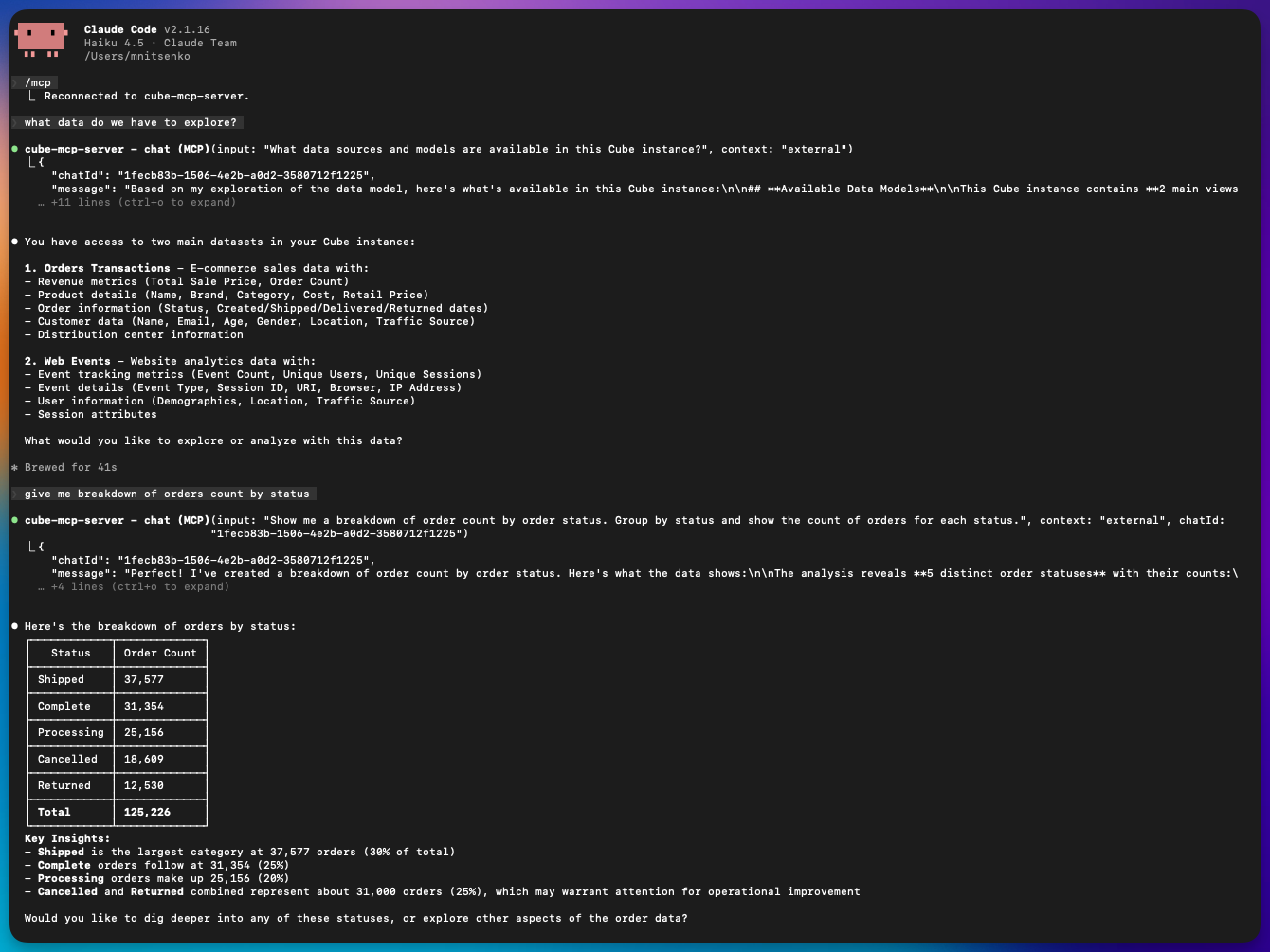
Ask a question in natural language and let the agent do the planning: `chat` returns the
answer along with the SQL it generated, and `loadQueryResults` pages through large result
sets. Use this for summaries, trends, and ad-hoc analysis.
To drive the query yourself instead, call `searchDataModel` to find the right view and
members, then run your own SQL with `runQuery`.
## Connect to Cursor
Add the MCP endpoint under Tools & MCP Settings, then complete the OAuth flow.
```json theme={null}
{
"mcpServers": {
"cube-mcp-server": {
"command": "npx",
"args": ["-y", "mcp-remote", "--transport", "http", "https://cubecloud.dev/mcp"]
}
}
}
```
## Connect to Codex
Preferred (CLI):
```bash theme={null}
codex mcp add cube-mcp-server --url https://cubecloud.dev/mcp
```
If this is your first time using MCP in Codex, enable the feature in `~/.codex/config.toml`:
```editorconfig theme={null}
[features]
rmcp_client = true
```
Manual setup:
```editorconfig theme={null}
[features]
rmcp_client = true
[mcp_servers."cube-mcp-server"]
url = "https://cubecloud.dev/mcp"
```
Then run `codex mcp login cube-mcp-server` to authenticate.
## Connect to other MCP clients
For any MCP-compatible client:
1. Add a new server with the **MCP endpoint**.
2. The client will auto-discover OAuth and prompt for authentication.
3. Complete the OAuth flow to grant access to your Cube deployment.
## Select a deployment and agent
An MCP client is not locked to a single deployment for the whole session. After
connecting, it can discover the deployments and agents you can access and target a
specific one on each request.
Three tools work together:
* **`listDeployments`** — discovery. Returns every deployment you can access via MCP
(already filtered by the admin's deployment-access settings and your permissions) and
each deployment's agents. Use it to find valid `deploymentId` and `agentId` values
before calling `chat`. Every deployment offers an **Auto** agent (`agentId: null`) in
addition to any configured agents.
* **`chat`** — accepts two optional selection parameters:
* **`deploymentId`** — the deployment to use for this request. When omitted, the chat
uses the deployment from the current session (the default resolved at connect time).
* **`agentId`** — the agent to use for this request. When omitted or `null`, the
deployment's **Auto** agent is used. Pass a specific `agentId` to route to a
configured agent.
* **`loadQueryResults`** — paginates through the results of a previous query on the same
deployment context.
A typical client workflow:
Complete the OAuth flow. The session is scoped to the tenant default deployment (or
the first one you can access).
Call `listDeployments` to see the available `deploymentId` / `agentId` values.
Call `chat` with your `input`, optionally passing `deploymentId` and/or `agentId` to
target a specific deployment or agent. Omit both to use the session default deployment
with its Auto agent.
Requests are always validated against the admin's deployment-access settings. A deployment
that is outside the allow-list — or that you don't have permission to see — is rejected
with a **403 Forbidden** (`Deployment is not available via MCP for this account`), so
neither `listDeployments` nor the `chat` selection can reach an excluded deployment.
## Target a dev-mode branch
By default, an MCP session reads and queries the deployed data model. To exercise a
[development mode][ref-dev-mode] branch — a data-model change plus its agent
configuration (skills, rules, spaces) — before it's committed, connect with the dev
`branchName` returned by `startDataModelEdit`:
```text theme={null}
https://cubecloud.dev/mcp?branchName=dev--
```
A client that can't set a query parameter on the endpoint can send the same value as an
`x-mcp-branch-name` header instead (checked first; `mcp-branch-name` is a second, lower-priority
alias). Only an active dev branch is accepted — `main`, the deploy branch, or a branch
with no dev worker running is rejected at connect time with a `400` error, never a silent
fallback to the deployed model.
Once connected this way, every branch-aware tool below defaults to that branch instead of
the deployed model — you don't need to keep passing `branchName` on each call. Any tool
can still override it per call: pass a different `branchName` to target another branch for
just that one request, or pass `null` to force the deployed model for one call on an
otherwise branch-scoped session. Every response echoes back the branch it actually ran on
as `branchName` (`null` means the deployed model), so a client can always confirm what it
queried.
## Available actions
The MCP server exposes 30 tools, grouped below.
Every tool runs as the authenticated user. Queries respect the same
[permissions][ref-roles] as the rest of Cube, including row-level security — MCP is a new
way to reach your data, not a new access surface — with one exception, reachable two
ways: deleting a [workspace folder][ref-folders] skips the content-permission check the
Workspace page applies, whether it's [`manageFolders`](#dashboard-authoring) or the
agent behind [`chat`](#deployments-and-chat) doing the deleting.
### Read and write tools
Each tool is annotated as read-only, write, or destructive. MCP clients that honor these
annotations — including Claude — run read-only tools automatically and **always ask for
confirmation** before any of the nine destructive ones: `updateReport`, `deleteReport`,
`manageFolders`, `updateDashboard`, `publishDashboard`, `writeDataModelFile`,
`deleteDataModelFile`, `mergeToDefaultBranch`, and `discardDataModelChanges`. A tool
annotated write, not destructive, may run without a prompt — including
`commitDataModelChanges`, which can publish straight to production in one case; see [How
model edits stay safe](#how-model-edits-stay-safe). A tool annotated read-only can still
cause a write once it runs — `chat` is that case; see [Deployments and
chat](#deployments-and-chat).
### Deployments and chat
| Tool | Description | Access |
| ------------------ | ---------------------------------------------------------------------------------------------------------------------------------------------------------------------------------------- | ----------------------------- |
| `listDeployments` | Lists the deployments and agents you can reach over MCP. | Read-only |
| `chat` | Asks a question of a Cube agent, optionally targeting a specific deployment and agent. Pass `branchName` to have the agent answer from a dev branch's model instead of the deployed one. | Read-only — see warning below |
| `loadQueryResults` | Paginates through the results of a previous query. | Read-only |
See [Select a deployment and agent](#select-a-deployment-and-agent) for how these three
work together.
`chat`'s **Read-only** annotation covers only the MCP call itself, not what the agent
does in response. It's the same agent Analytics Chat uses, with the same write-capable
tools — creating reports, organizing workspace folders — when the caller's access allows
it, and the agent's own folder actions run with no confirmation step — unlike
`manageFolders` below, which a client prompts for. A client that runs `chat`
automatically because the annotation says read-only can still cause an unconfirmed write
through the agent's own reply.
A chat conversation is pinned to whichever branch answered its first message — later
messages in the same conversation stay on that branch, and `loadQueryResults` pages using
it. Passing a different `branchName` while resuming an existing `chatId` fails rather than
silently switching branches mid-conversation: omit `branchName` to keep talking on the
conversation's branch, or omit `chatId` to start a new conversation on the one you want.
### Query and discovery
| Tool | Description | Access |
| ----------------- | -------------------------------------------------------------------------------------------------------------------------------------------------------------------------------------------------------------------------------------------------------------------------------------------------------------------------------------------------- | --------- |
| `searchDataModel` | Searches the semantic model by similarity — views and their measures and dimensions — to discover what is queryable. Returns compact records (name, title, description, type) to reference in `runQuery`. Pass the dev `branchName` from `startDataModelEdit` to search that branch's model, including members that don't exist in production yet. | Read-only |
| `runQuery` | Runs a Cube SQL query (PostgreSQL dialect) against the [SQL API][ref-sql-api]. Returns a schema, a page of rows, and `hasMore` / `totalRows` for pagination via `offset`. Pass the dev `branchName` from `startDataModelEdit` to query that branch instead of the deployed model. | Read-only |
Call `searchDataModel` before `runQuery` to find exact view and member names rather than
guessing them — pass the same `branchName` to both so the members you find are the ones the
query will see.
Omitting `branchName` on a call uses the session's branch if you [connected with
one](#target-a-dev-mode-branch), or the deployed model otherwise; passing `null` forces the
deployed model for that one call regardless of the session. Passing a `branchName` that
isn't an active dev branch — for example the deploy branch's own name, or a feature branch
with no dev worker running — fails with an error rather than silently answering from the
deployed model, so a query aimed at the wrong branch never looks like a query that just
returned no rows.
### Dashboard authoring
These tools build [workbooks][ref-workbooks] and [dashboards][ref-dashboards]
programmatically. Creating and editing workbooks requires the Explorer role or higher.
| Tool | Description | Access |
| ------------------ | ------------------------------------------------------------------------------------------------------------------------------------------------------------------------------------------------------------------------------------------------------------------------------------------------------------------------------------------------------ | --------------------- |
| `readWorkbook` | Reads a workbook — its name and its current dashboard draft and published configs. | Read-only |
| `createWorkbook` | Creates a new empty workbook, the container that holds reports and a dashboard. | Write |
| `createReport` | Saves a query plus its visualization. Pass `workbookId` to create a report inside a workbook and get the `reportId` a chart widget references; omit `workbookId` to save a standalone [exploration](/docs/explore-analyze/explore#saving-explorations) instead. Pass `folderId` to file a standalone exploration in a [workspace folder][ref-folders]. | Write |
| `readReport` | Reads one workbook report or standalone exploration by id — its title, SQL, chart spec, placement, and a shareable URL. | Read-only |
| `updateReport` | Edits an existing workbook report or exploration in place, keeping its `reportId`. Send only the fields you want to change — including `folderId` to move a standalone exploration into a [workspace folder][ref-folders]. | Destructive — prompts |
| `deleteReport` | Deletes a workbook report or exploration. | Destructive — prompts |
| `manageFolders` | Lists, creates, renames, moves, or deletes the [workspace folders][ref-folders] that standalone explorations, workbooks, and dashboards are filed in. | Destructive — prompts |
| `updateDashboard` | Saves the dashboard layout to the workbook **draft**. Replaces the full widget set and does not go live. | Destructive — prompts |
| `publishDashboard` | Publishes the current draft to make it live. Idempotent — republishing an unchanged draft is a no-op. | Destructive — prompts |
Drafts are the safety net here: `updateDashboard` only ever writes to the draft, so a
published dashboard keeps serving its previous version until you approve
`publishDashboard`. See [Build a dashboard](#build-a-dashboard) for the full sequence.
Call `manageFolders` with `action: "list"` first to get a folder's numeric id — that id,
not its name, is what `folderId` takes on `createReport` and `updateReport` to place a
standalone exploration inside it. The annotation covers the whole tool, so a client
prompts for `list` as it would for `delete`. Its delete [destroys less than the
Workspace page but checks less too][ref-deleting-folders].
**To change an existing report, use `updateReport` — never recreate it.** A dashboard's
chart widget points at a specific `reportId`, so replacing a report with a new one orphans
every widget referencing it. The same caution applies to moving a report between workbooks:
a widget resolves its report from its *own* workbook's report list, so changing a report's
`workbookId` empties the tiles on the old workbook's dashboard. Call `readWorkbook` and
re-point those widgets with `updateDashboard` first.
### Data model editing
These tools read and edit the semantic model **source** files. They are registered only
for users whose role grants permission to edit the semantic model — Admin and Developer by
default. Users without it never see them.
| Tool | Description | Access |
| --------------------- | ------------------------------------------------------------------------------------------------------------------------------------------------------------------------------- | --------------------- |
| `listDataModelFiles` | Lists the semantic model source files (raw YAML, JavaScript, or Python). Pass `branchName` to list a dev branch's files instead of the deploy branch's. | Read-only |
| `readDataModelFile` | Reads one file's raw source. Pass `branchName` to read it from a dev branch instead of the deploy branch. | Read-only |
| `startDataModelEdit` | Enters [development mode][ref-dev-mode], starts a dev worker, and returns the dev `branchName` that every write tool requires. | Write |
| `writeDataModelFile` | Creates or overwrites a model source file on the dev branch (whole-file replacement). Recompiles the model and reports `valid` plus any `validationError`. | Destructive — prompts |
| `deleteDataModelFile` | Deletes a model source file on the dev branch. | Destructive — prompts |
| `getDataModelChanges` | Shows the diff of the dev branch against its parent — the pending changes, for review before committing. | Read-only |
| `getBranchDiff` | Shows what **any** branch changed against the deploy branch: the changed-file list with per-file line counts, plus the unified diff. | Read-only |
| `getDeploymentEnv` | Lists the deployment's environment variables, with every secret-looking value redacted to `[ENCRYPTED]`. Useful for confirming configuration is present and shaped as expected. | Read-only |
`getDataModelChanges` answers "what have I changed?" for your own dev branch against its
immediate parent. `getBranchDiff` answers "what did this branch change?" for any branch,
including feature branches — reach for it when a change edits existing cubes, where the
file list looks identical on both branches and `listDataModelFiles` reveals nothing.
`getDeploymentEnv` never returns secret values. Anything that looks like a credential is
replaced with `[ENCRYPTED]` before it leaves Cube, so an AI client can verify that a
variable is set without ever seeing what it is set to.
### How model edits stay safe
Model editing over MCP is constrained by several mechanisms — most enforced by the MCP
server, one by clients that honor tool annotations, and one that is yours to apply —
with one gap noted below:
* **File writes never touch production.** Every write goes to a personal dev branch named
`dev--`. `writeDataModelFile` and `deleteDataModelFile` reject any branch
that isn't a dev branch, so no file edit can land on the deploy branch directly.
* **`startDataModelEdit` is the only entry point.** It returns the dev `branchName`, and
`writeDataModelFile` and `deleteDataModelFile` require it. There is no way to write
without going through it first.
* **Merging a branch to production prompts for confirmation.** `mergeToDefaultBranch` — the tool
that publishes an already-committed branch — is marked destructive, so a client always
prompts for confirmation. See [Committing and publishing
changes](#committing-and-publishing-changes).
* **Registration is permission-gated.** Every tool in Data model editing, Committing and
publishing changes, and Pre-aggregations — the six model-editing tools, `getBranchDiff`,
`getDeploymentEnv`, the six commit and branch tools, and both pre-aggregation tools — is
offered only to users whose role allows editing the semantic model. A Viewer never sees
any of them.
* **Deploy-branch writes are permission-checked at call time.** A role scoped to **Edit data
model on dev branches** still sees every tool listed above registered, but `mergeToDefaultBranch`
and `commitDataModelChanges` with `confirmPublishToDefaultBranch` fail for that role, the
same as any other write targeting the deploy branch.
* **Verify on the branch, before a merge, not after.** Pass the dev `branchName` to
`runQuery` to check that an edit returns the right data — `valid: true` from
`writeDataModelFile` only means the model compiles, not that it's correct.
`commitDataModelChanges` is a second route to production: a dev branch created from the
deploy branch commits straight onto it, live, when the call sets
`confirmPublishToDefaultBranch`. That tool is **not** annotated destructive, so a client
isn't guaranteed to prompt first. For a role that holds full **Edit data model**, the
tool's own description is the only thing standing in the way — it tells the agent to set
the flag only on your explicit say-so, never to retry a refusal on its own.
### Committing and publishing changes
Editing the model with the tools above only ever writes to a personal dev branch's
working copy — reachable on that branch's endpoints, and in the Cube UI once you've
switched to it, but invisible to everyone else until it's committed. These tools commit
that work, publish it, or throw it away. They're registered under the same
semantic-model permission as the data model tools above, and a client can call them
without ever using the Cube UI.
| Tool | Description | Access |
| ------------------------- | ----------------------------------------------------------------------------------------------------------------------------------------------------------------- | ------------------------------------------------------------------- |
| `getBranchState` | Reports the branch this session works on, the branch you're looking at in the Cube UI, the deploy branch, and whether the session's branch has uncommitted edits. | Read-only |
| `commitDataModelChanges` | Commits the dev branch's edits onto the branch it was created from — including the deploy branch, live, when the call sets `confirmPublishToDefaultBranch`. | Write — see [How model edits stay safe](#how-model-edits-stay-safe) |
| `commitToNewBranch` | Commits the dev branch's edits to a new branch instead, optionally opening a pull request. | Write |
| `mergeToDefaultBranch` | Merges a committed branch into the deploy branch, making it live for everyone. | Destructive — prompts |
| `discardDataModelChanges` | Resets the dev branch to its parent (or to a given commit hash), throwing away pending edits. | Destructive — prompts |
| `switchUserBranch` | Switches your own Cube UI over to a branch, the same action as its branch switcher, so you can see and test what was committed. | Write |
These mirror the "Commit & Sync", "Merge" / "Create a Pull Request", and branch-switching
actions described in [Development mode][ref-dev-mode] — a client can now drive that same
flow instead of asking you to click through it. One difference: the UI's Merge button
targets the branch's parent, whichever branch that is, while `mergeToDefaultBranch`
always targets the deploy branch.
Call `getBranchState` before editing, to see whether the MCP session's branch and the
branch your Cube UI shows are the same, and again after committing, to see whether you
still need `switchUserBranch` to see the result.
### Pre-aggregations
These tools inspect and trigger [pre-aggregation][ref-pre-aggregations] builds. They are
registered under the same semantic-model permission as the data model tools above.
| Tool | Description | Access |
| ------------------------- | ---------------------------------------------------------------------------------------------------------------------------------------------------------------------------------------------------------------------------------------------------------------------------------------------- | --------- |
| `getPreAggregationStatus` | Lists the data model's pre-aggregations with their definitions and, for each, how many partitions exist, how many were built, when the newest build landed, and the exact error if a build failed. Pass `branchName` to check a dev branch's pre-aggregations instead of the deployed model's. | Read-only |
| `buildPreAggregation` | Queues an on-demand build of one pre-aggregation and returns once it is accepted. The build runs asynchronously. Pass `branchName` to build against a dev branch's definition. | Write |
Together these close the loop on pre-aggregation work: a query alone cannot prove a rollup
was used, and external pre-aggregations fail in configuration-specific ways — a missing
export bucket, denied bucket permissions — that only an actual build surfaces. Call
`buildPreAggregation`, then poll `getPreAggregationStatus` to see whether the partitions
built or to read the failure.
`buildPreAggregation` runs real queries against your data warehouse and, for external
pre-aggregations, writes through the export bucket. It consumes warehouse resources, so
expect a cost per build.
## Example workflows
### Ask a data question
Ask a question in natural language and let the agent do the planning: `chat` returns the
answer along with the SQL it generated, and `loadQueryResults` pages through large result
sets. Use this for summaries, trends, and ad-hoc analysis.
To drive the query yourself instead, call `searchDataModel` to find the right view and
members, then run your own SQL with `runQuery`.
 ### Build a dashboard
Four of the dashboard tools build a new dashboard, and they are designed to be used in
order. `readWorkbook`, `readReport`, `updateReport`, and `deleteReport` inspect and
change one that already exists, and `manageFolders` organizes the workspace folders
those workbooks and dashboards live in.
Call `createWorkbook` with a name. It returns the `workbookId` every later step needs.
If you were given an existing workbook to build into, call `readWorkbook` instead and
skip to the next step.
Call `createReport` once per chart, KPI tile, or table, passing the `workbookId` and
the SQL query that powers it. Each call returns a `reportId`.
Call `updateDashboard` with the complete widget set, referencing each `reportId` from
the previous step. This replaces the draft layout and saves to the workbook draft —
the live dashboard is unchanged. Your client will ask you to confirm.
Review the draft, then call `publishDashboard` to make it live. This also prompts for
confirmation. It returns the dashboard URL.
To change a dashboard later, call `readWorkbook` first and edit on top of the current
draft rather than overwriting it. To change one chart rather than the layout, call
`readReport` on the widget's `reportId` and edit it with `updateReport` — that keeps the
id, so every widget pointing at it keeps rendering.
### Edit the data model
Call `startDataModelEdit` to enter development mode and get a dev `branchName`. Explore
the current source with `listDataModelFiles` and `readDataModelFile`, then apply changes
with `writeDataModelFile` or `deleteDataModelFile`, passing that `branchName`. Each write
recompiles the model and reports validation errors, so you can iterate until it compiles.
Before committing, verify the change returns the right data: call `runQuery` with the same
`branchName` and check the numbers, since a compiling model can still return wrong results.
Review the result with `getDataModelChanges`, then see [Ship a model
edit](#ship-a-model-edit) to land the change and make it live.
To review a branch you didn't author — a colleague's feature branch, say — call
`getBranchDiff` with its name instead. It compares against the deploy branch and returns
the full changed-file list even when the patch itself is trimmed.
### Ship a model edit
Once `writeDataModelFile` edits compile and `runQuery` confirms they return the right
data, call `commitDataModelChanges` to land them on the branch the dev branch forked
from — read [How model edits stay safe](#how-model-edits-stay-safe) first if that
branch is the deploy branch. Use `commitToNewBranch` instead to put them on a new
branch, optionally with a pull request.
Either way, use `switchUserBranch` to point your own Cube UI at the result so you can
see it. `mergeToDefaultBranch` is the publish step: it makes the branch live for
everyone, so call it only when you want the change in production — no tool reverts it
afterwards. If an edit isn't working out, `discardDataModelChanges` throws it away
instead of committing it; it resets the dev branch only, so it is not an undo for a merge.
### Verify a pre-aggregation
After adding or changing a pre-aggregation, call `getPreAggregationStatus` to see whether
its partitions exist and when they were last built. If nothing has been built yet — or you
want to confirm an external pre-aggregation's export bucket actually works — call
`buildPreAggregation`, then poll `getPreAggregationStatus` again. A failed build reports
the exact error, which is usually a configuration problem rather than a modeling one;
`getDeploymentEnv` will tell you whether the expected variables (`CUBEJS_DB_EXPORT_BUCKET`
and friends) are set.
## Troubleshooting
* **MCP configuration is unavailable**: Configure the MCP server URL.
* **MCP OAuth integration is not configured**: Enable MCP in **Admin → Team & Security → OAuth Integrations**.
* **No deployments available / MCP access is disabled**: In **Admin → MCP Server → Deployment Access**, make sure **Limit available deployments** is off, or that at least one deployment is selected and the user has permission to access it.
* **`Deployment is not available via MCP for this account` (403)**: The requested deployment is excluded by the deployment-access allow-list or by the user's permissions. Call `listDeployments` to see which deployments are reachable, or adjust the allow-list in **Admin → MCP Server → Deployment Access**.
[ref-roles]: /admin/users-and-permissions/roles-and-permissions
[ref-pre-aggregations]: /docs/pre-aggregations/using-pre-aggregations
[ref-sql-api]: /reference/core-data-apis/sql-api
[ref-workbooks]: /docs/explore-analyze/workbooks
[ref-dashboards]: /docs/explore-analyze/dashboards
[ref-dev-mode]: /docs/data-modeling/dev-mode
[ref-folders]: /docs/organize-content/folders
[ref-deleting-folders]: /docs/organize-content/folders#deleting-folders
### Build a dashboard
Four of the dashboard tools build a new dashboard, and they are designed to be used in
order. `readWorkbook`, `readReport`, `updateReport`, and `deleteReport` inspect and
change one that already exists, and `manageFolders` organizes the workspace folders
those workbooks and dashboards live in.
Call `createWorkbook` with a name. It returns the `workbookId` every later step needs.
If you were given an existing workbook to build into, call `readWorkbook` instead and
skip to the next step.
Call `createReport` once per chart, KPI tile, or table, passing the `workbookId` and
the SQL query that powers it. Each call returns a `reportId`.
Call `updateDashboard` with the complete widget set, referencing each `reportId` from
the previous step. This replaces the draft layout and saves to the workbook draft —
the live dashboard is unchanged. Your client will ask you to confirm.
Review the draft, then call `publishDashboard` to make it live. This also prompts for
confirmation. It returns the dashboard URL.
To change a dashboard later, call `readWorkbook` first and edit on top of the current
draft rather than overwriting it. To change one chart rather than the layout, call
`readReport` on the widget's `reportId` and edit it with `updateReport` — that keeps the
id, so every widget pointing at it keeps rendering.
### Edit the data model
Call `startDataModelEdit` to enter development mode and get a dev `branchName`. Explore
the current source with `listDataModelFiles` and `readDataModelFile`, then apply changes
with `writeDataModelFile` or `deleteDataModelFile`, passing that `branchName`. Each write
recompiles the model and reports validation errors, so you can iterate until it compiles.
Before committing, verify the change returns the right data: call `runQuery` with the same
`branchName` and check the numbers, since a compiling model can still return wrong results.
Review the result with `getDataModelChanges`, then see [Ship a model
edit](#ship-a-model-edit) to land the change and make it live.
To review a branch you didn't author — a colleague's feature branch, say — call
`getBranchDiff` with its name instead. It compares against the deploy branch and returns
the full changed-file list even when the patch itself is trimmed.
### Ship a model edit
Once `writeDataModelFile` edits compile and `runQuery` confirms they return the right
data, call `commitDataModelChanges` to land them on the branch the dev branch forked
from — read [How model edits stay safe](#how-model-edits-stay-safe) first if that
branch is the deploy branch. Use `commitToNewBranch` instead to put them on a new
branch, optionally with a pull request.
Either way, use `switchUserBranch` to point your own Cube UI at the result so you can
see it. `mergeToDefaultBranch` is the publish step: it makes the branch live for
everyone, so call it only when you want the change in production — no tool reverts it
afterwards. If an edit isn't working out, `discardDataModelChanges` throws it away
instead of committing it; it resets the dev branch only, so it is not an undo for a merge.
### Verify a pre-aggregation
After adding or changing a pre-aggregation, call `getPreAggregationStatus` to see whether
its partitions exist and when they were last built. If nothing has been built yet — or you
want to confirm an external pre-aggregation's export bucket actually works — call
`buildPreAggregation`, then poll `getPreAggregationStatus` again. A failed build reports
the exact error, which is usually a configuration problem rather than a modeling one;
`getDeploymentEnv` will tell you whether the expected variables (`CUBEJS_DB_EXPORT_BUCKET`
and friends) are set.
## Troubleshooting
* **MCP configuration is unavailable**: Configure the MCP server URL.
* **MCP OAuth integration is not configured**: Enable MCP in **Admin → Team & Security → OAuth Integrations**.
* **No deployments available / MCP access is disabled**: In **Admin → MCP Server → Deployment Access**, make sure **Limit available deployments** is off, or that at least one deployment is selected and the user has permission to access it.
* **`Deployment is not available via MCP for this account` (403)**: The requested deployment is excluded by the deployment-access allow-list or by the user's permissions. Call `listDeployments` to see which deployments are reachable, or adjust the allow-list in **Admin → MCP Server → Deployment Access**.
[ref-roles]: /admin/users-and-permissions/roles-and-permissions
[ref-pre-aggregations]: /docs/pre-aggregations/using-pre-aggregations
[ref-sql-api]: /reference/core-data-apis/sql-api
[ref-workbooks]: /docs/explore-analyze/workbooks
[ref-dashboards]: /docs/explore-analyze/dashboards
[ref-dev-mode]: /docs/data-modeling/dev-mode
[ref-folders]: /docs/organize-content/folders
[ref-deleting-folders]: /docs/organize-content/folders#deleting-folders